Upsertion
Upsert refers to the process of uploading and processing documents into vector stores, forming the foundation of Retrieval Augmented Generation (RAG) systems.
There are two fundamental ways to upsert data into vector store:
- Document Stores (Recommended)
- Chatflow Upsert
We highly recommend using Document Stores as it provides a unified interface to help with the RAG pipelines - retrieveing data from different sources, chunking strategy, upserting to vector database, syncing with updated data.
In this guide, we are going to cover another method - Chatflow Upsert. This is an older method prior to Document Stores.
For details, see the Vector Upsert Endpoint API Reference.
Understanding the upserting process
Chatflow allows you to create a flow that can do both upserting and RAG querying process, both can be run idenpendently.
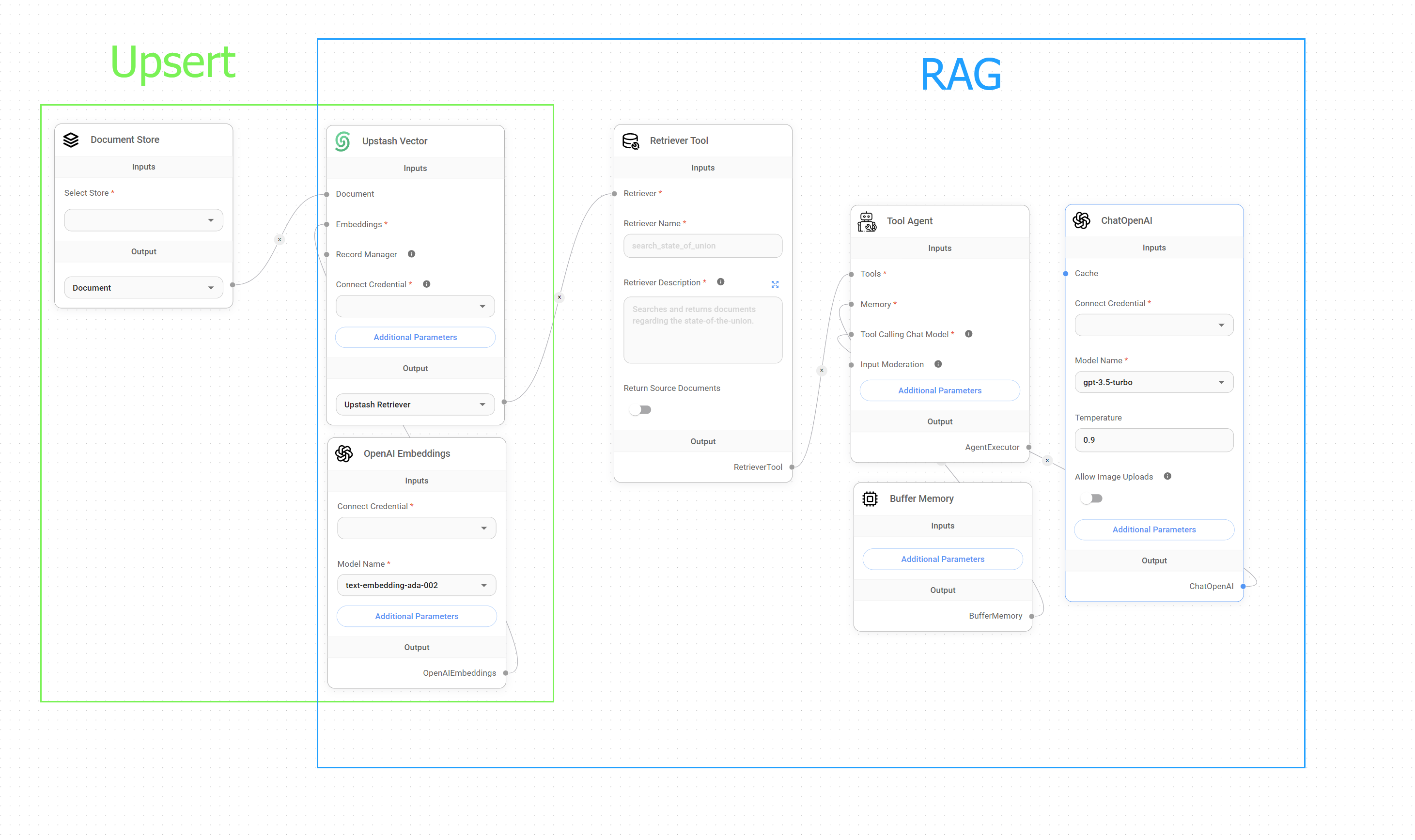
Upsert vs. RAG
Setup
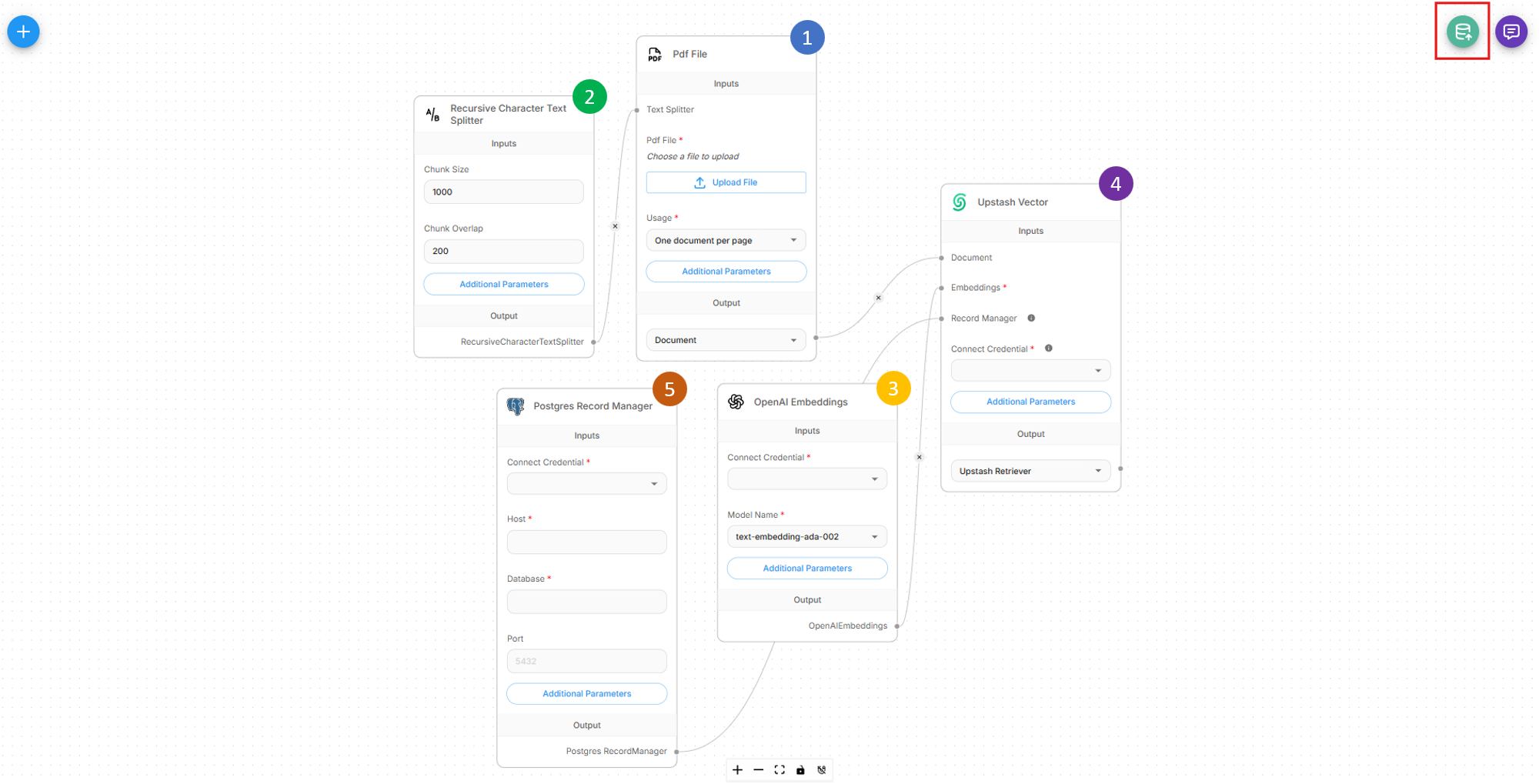
For an upsert process to work, we would need to create an upserting flow with 5 different nodes:
- Document Loader
- Text Splitter
- Embedding Model
- Vector Store
- Record Manager (Optional)
All of the elements have been covered in Document Stores, refer there for more details.
Once flow is setup correctly, there will be a green button at the top right that allows user to start the upsert process.
 (1) (1) (1) (1) (1) (1)-8d7a1efbb51e842299e9f15b4cccff4f.png)
The upsert process can also be carried out via API:
 (1) (1) (1) (1) (1)-b3a02484aace4035a059caf3de8e883f.png)
Base URL and Authentication
Base URL: http://localhost:3000 (or your CiniterFlow instance URL)
Endpoint: POST /api/v1/vector/upsert/:id
Authentication: API key authentication is required for the upsert endpoint. You can generate an API key from the CiniterFlow dashboard under Settings → API Keys.
Request Methods
The API supports two different request methods depending on your chatflow configuration:
1. Form Data (File Upload)
Used when your chatflow contains Document Loaders with file upload capability.
2. JSON Body (No File Upload)
Used when your chatflow uses Document Loaders that don't require file uploads (e.g., web scrapers, database connectors).
To override any node configurations such as files, metadata, etc., you must explicitly enable that option.
 (1) (1) (1)-cb240abbe3c1bd88fabdc6dad69a2748.png)
Document Loaders with File Upload
Supported Document Types
| Document Loader | File Types |
|---|---|
| CSV File | .csv |
| Docx/Word File | .docx |
| JSON File | .json |
| JSON Lines File | .jsonl |
| PDF File | .pdf |
| Text File | .txt |
| Excel File | .xlsx |
| Powerpoint File | .pptx |
| File Loader | Multiple |
| Unstructured File | Multiple |
Important: Ensure the file type matches your Document Loader configuration. For maximum flexibility, consider using the File Loader which supports multiple file types.
Request Format (Form Data)
When uploading files, use multipart/form-data instead of JSON:
Examples
Python
import requests
import os

def upsert_document(chatflow_id, file_path, config=None):
    """
    Upsert a single document to a vector store.

    Args:
        chatflow_id (str): The chatflow ID configured for vector upserting
        file_path (str): Path to the file to upload
        return_source_docs (bool): Whether to return source documents in response
        config (dict): Optional configuration overrides

    Returns:
        dict: API response containing upsert results
    """
    url = f"http://localhost:3000/api/v1/vector/upsert/`{chatflow_id}`"

    # Prepare file data
    files = {
        'files': (os.path.basename(file_path), open(file_path, 'rb'))
    }

    # Prepare form data
    data = {}

    # Add configuration overrides if provided
    if config:
        data['overrideConfig'] = str(config).replace("'", '"')  # Convert to JSON string

    try:
        response = requests.post(url, files=files, data=data)
        response.raise_for_status()

        return response.json()

    except requests.exceptions.RequestException as e:
        print(f"Upload failed: `{e}`")
        return None
    finally:
        # Always close the file
        files['files'][1].close()

# Example usage
result = upsert_document(
    chatflow_id="your-chatflow-id",
    file_path="documents/knowledge_base.pdf",
    config={
        "chunkSize": 1000,
        "chunkOverlap": 200
    }
)

if result:
    print(f"Successfully upserted {result.get('numAdded', 0)} chunks")
    if result.get('sourceDocuments'):
        print(f"Source documents: {len(result['sourceDocuments'])}")
else:
    print("Upload failed")
Javascript (Browser)
class VectorUploader {
    constructor(baseUrl = 'http://localhost:3000') {
        this.baseUrl = baseUrl;
    }

    async upsertDocument(chatflowId, file, config = {}) {
        /**
         * Upload a file to vector store from browser
         * @param `{string}` chatflowId - The chatflow ID
         * @param `{File}` file - File object from input element
         * @param `{Object}` config - Optional configuration
         */

        const formData = new FormData();
        formData.append('files', file);

        if (config.overrideConfig) {
            formData.append('overrideConfig', JSON.stringify(config.overrideConfig));
        }

        try {
            const response = await fetch(`${this.baseUrl}/api/v1/vector/upsert/${chatflowId}`, {
                method: 'POST',
                body: formData
            });

            if (!response.ok) {
                throw new Error(`HTTP error! status: ${response.status}`);
            }

            const result = await response.json();
            return result;

        } catch (error) {
            console.error('Upload failed:', error);
            throw error;
        }
    }


}

// Example usage in browser
const uploader = new VectorUploader();

// Single file upload
document.getElementById('fileInput').addEventListener('change', async function(e) {
    const file = e.target.files[0];
    if (file) {
        try {
            const result = await uploader.upsertDocument(
                'your-chatflow-id',
                file,
                {
                    overrideConfig: {
                        chunkSize: 1000,
                        chunkOverlap: 200
                    }
                }
            );

            console.log('Upload successful:', result);
            alert(`Successfully processed ${result.numAdded || 0} chunks`);

        } catch (error) {
            console.error('Upload failed:', error);
            alert('Upload failed: ' + error.message);
        }
    }
});
Javascript (Node.js)
const fs = require('fs');
const path = require('path');
const FormData = require('form-data');
const fetch = require('node-fetch');

class NodeVectorUploader {
    constructor(baseUrl = 'http://localhost:3000') {
        this.baseUrl = baseUrl;
    }

    async upsertDocument(chatflowId, filePath, config = {}) {
        /**
         * Upload a file to vector store from Node.js
         * @param `{string}` chatflowId - The chatflow ID
         * @param `{string}` filePath - Path to the file
         * @param `{Object}` config - Optional configuration
         */

        if (!fs.existsSync(filePath)) {
            throw new Error(`File not found: ${filePath}`);
        }

        const formData = new FormData();
        const fileStream = fs.createReadStream(filePath);

        formData.append('files', fileStream, {
            filename: path.basename(filePath),
            contentType: this.getMimeType(filePath)
        });

        if (config.overrideConfig) {
            formData.append('overrideConfig', JSON.stringify(config.overrideConfig));
        }

        try {
            const response = await fetch(`${this.baseUrl}/api/v1/vector/upsert/${chatflowId}`, {
                method: 'POST',
                body: formData,
                headers: formData.getHeaders()
            });

            if (!response.ok) {
                const errorText = await response.text();
                throw new Error(`HTTP ${response.status}: ${errorText}`);
            }

            return await response.json();

        } catch (error) {
            console.error('Upload failed:', error);
            throw error;
        }
    }

    getMimeType(filePath) {
        const ext = path.extname(filePath).toLowerCase();
        const mimeTypes = {
            '.pdf': 'application/pdf',
            '.txt': 'text/plain',
            '.docx': 'application/vnd.openxmlformats-officedocument.wordprocessingml.document',
            '.csv': 'text/csv',
            '.json': 'application/json'
        };
        return mimeTypes[ext] || 'application/octet-stream';
    }
}

// Example usage
async function main() {
    const uploader = new NodeVectorUploader();

    try {
        // Single file upload
        const result = await uploader.upsertDocument(
            'your-chatflow-id',
            './documents/manual.pdf',
            {
                overrideConfig: {
                    chunkSize: 1200,
                    chunkOverlap: 100
                }
            }
        );

        console.log('Single file upload result:', result);
    } catch (error) {
        console.error('Process failed:', error);
    }
}

// Run if this file is executed directly
if (require.main === module) {
    main();
}

module.exports = { NodeVectorUploader };
cURL
# Basic file upload with cURL
curl -X POST "http://localhost:3000/api/v1/vector/upsert/your-chatflow-id" \
  -F "files=@documents/knowledge_base.pdf"

# File upload with configuration override
curl -X POST "http://localhost:3000/api/v1/vector/upsert/your-chatflow-id" \
  -F "files=@documents/manual.pdf" \
  -F 'overrideConfig={"chunkSize": 1000, "chunkOverlap": 200}'

# Upload with custom headers for authentication (if configured)
curl -X POST "http://localhost:3000/api/v1/vector/upsert/your-chatflow-id" \
  -H "Authorization: Bearer your-api-token" \
  -F "files=@documents/faq.txt" \
  -F 'overrideConfig={"chunkSize": 800, "chunkOverlap": 150}'
Document Loaders without File Upload
For Document Loaders that don't require file uploads (e.g., web scrapers, database connectors, API integrations), use JSON format similar to the Prediction API.
Examples
Python
import requests
from typing import Dict, Any, Optional

def upsert(chatflow_id: str, config: Optional[Dict[str, Any]] = None) -> Optional[Dict[str, Any]]:
    """
    Trigger vector upserting for chatflows that don't require file uploads.

    Args:
        chatflow_id: The chatflow ID configured for vector upserting
        config: Optional configuration overrides

    Returns:
        API response containing upsert results
    """
    url = f"http://localhost:3000/api/v1/vector/upsert/`{chatflow_id}`"

    payload = {
        "overrideConfig": config
    }

    headers = {
        "Content-Type": "application/json"
    }

    try:
        response = requests.post(url, json=payload, headers=headers, timeout=300)
        response.raise_for_status()

        return response.json()

    except requests.exceptions.RequestException as e:
        print(f"Upsert failed: `{e}`")
        return None

result = upsert(
    chatflow_id="chatflow-id",
    config={
        "chunkSize": 800,
        "chunkOverlap": 100,
    }
)

if result:
    print(f"Upsert completed: {result.get('numAdded', 0)} chunks added")
JavaScript
class NoFileUploader {
    constructor(baseUrl = 'http://localhost:3000') {
        this.baseUrl = baseUrl;
    }

    async upsertWithoutFiles(chatflowId, config = {}) {
        /**
         * Trigger vector upserting for flows that don't need file uploads
         * @param `{string}` chatflowId - The chatflow ID
         * @param `{Object}` config - Configuration overrides
         */

        const payload = {
            overrideConfig: config
        };

        try {
            const response = await fetch(`${this.baseUrl}/api/v1/vector/upsert/${chatflowId}`, {
                method: 'POST',
                headers: {
                    'Content-Type': 'application/json',
                },
                body: JSON.stringify(payload)
            });

            if (!response.ok) {
                throw new Error(`HTTP error! status: ${response.status}`);
            }

            return await response.json();

        } catch (error) {
            console.error('Upsert failed:', error);
            throw error;
        }
    }

    async scheduledUpsert(chatflowId, interval = 3600000) {
        /**
         * Set up scheduled upserting for dynamic content sources
         * @param `{string}` chatflowId - The chatflow ID
         * @param `{number}` interval - Interval in milliseconds (default: 1 hour)
         */

        console.log(`Starting scheduled upsert every ${interval/1000} seconds`);

        const performUpsert = async () => {
            try {
                console.log('Performing scheduled upsert...');

                const result = await this.upsertWithoutFiles(chatflowId, {
                    addMetadata: {
                        scheduledUpdate: true,
                        timestamp: new Date().toISOString()
                    }
                });

                console.log(`Scheduled upsert completed: ${result.numAdded || 0} chunks processed`);

            } catch (error) {
                console.error('Scheduled upsert failed:', error);
            }
        };

        // Perform initial upsert
        await performUpsert();

        // Set up recurring upserts
        return setInterval(performUpsert, interval);
    }
}

// Example usage
const uploader = new NoFileUploader();

async function performUpsert() {
    try {
        const result = await uploader.upsertWithoutFiles(
            'chatflow-id',
            {
                chunkSize: 800,
                chunkOverlap: 100
            }
        );

        console.log('Upsert result:', result);

    } catch (error) {
        console.error('Upsert failed:', error);
    }
}

// One time upsert
await performUpsert();

// Set up scheduled updates (every 30 minutes)
const schedulerHandle = await uploader.scheduledUpsert(
    'dynamic-content-chatflow-id',
    30 * 60 * 1000
);

// To stop scheduled updates later:
// clearInterval(schedulerHandle);
cURL
# Basic upsert with cURL
curl -X POST "http://localhost:3000/api/v1/vector/upsert/your-chatflow-id" \
  -H "Content-Type: application/json"

# Upsert with configuration override
curl -X POST "http://localhost:3000/api/v1/vector/upsert/your-chatflow-id" \
  -H "Content-Type: application/json" \
  -d '{
    "overrideConfig": {
      "returnSourceDocuments": true
    }
  }'

# Upsert with custom headers for authentication (if configured)
curl -X POST "http://localhost:3000/api/v1/vector/upsert/your-chatflow-id" \
  -H "Authorization: Bearer your-api-token" \
  -H "Content-Type: application/json"
Response Fields
| Field | Type | Description |
|---|---|---|
numAdded | number | Number of new chunks added to vector store |
numDeleted | number | Number of chunks deleted (if using Record Manager) |
numSkipped | number | Number of chunks skipped (if using Record Manager) |
numUpdated | number | Number of existing chunks updated (if using Record Manager) |
Optimization Strategies
1. Batch Processing Strategies
def intelligent_batch_processing(files: List[str], chatflow_id: str) -> Dict[str, Any]:
    """Process files in optimized batches based on size and type."""

    # Group files by size and type
    small_files = []
    large_files = []

    for file_path in files:
        file_size = os.path.getsize(file_path)
        if file_size > 5_000_000:  # 5MB
            large_files.append(file_path)
        else:
            small_files.append(file_path)

    results = {'successful': [], 'failed': [], 'totalChunks': 0}

    # Process large files individually
    for file_path in large_files:
        print(f"Processing large file: `{file_path}`")
        # Individual processing with custom config
        # ... implementation

    # Process small files in batches
    batch_size = 5
    for i in range(0, len(small_files), batch_size):
        batch = small_files[i:i + batch_size]
        print(f"Processing batch of {len(batch)} small files")
        # Batch processing
        # ... implementation

    return results
2. Metadata Optimization
import requests
import os
from datetime import datetime
from typing import Dict, Any

def upsert_with_optimized_metadata(chatflow_id: str, file_path: str,
                                 department: str = None, category: str = None) -> Dict[str, Any]:
    """
    Upsert document with automatically optimized metadata.
    """
    url = f"http://localhost:3000/api/v1/vector/upsert/`{chatflow_id}`"

    # Generate optimized metadata
    custom_metadata = {
        'department': department or 'general',
        'category': category or 'documentation',
        'indexed_date': datetime.now().strftime('%Y-%m-%d'),
        'version': '1.0'
    }

    optimized_metadata = optimize_metadata(file_path, custom_metadata)

    # Prepare request
    files = {'files': (os.path.basename(file_path), open(file_path, 'rb'))}
    data = {
        'overrideConfig': str({
            'metadata': optimized_metadata
        }).replace("'", '"')
    }

    try:
        response = requests.post(url, files=files, data=data)
        response.raise_for_status()
        return response.json()
    finally:
        files['files'][1].close()

# Example usage with different document types
results = []

# Technical documentation
tech_result = upsert_with_optimized_metadata(
    chatflow_id="tech-docs-chatflow",
    file_path="docs/api_reference.pdf",
    department="engineering",
    category="technical_docs"
)
results.append(tech_result)

# HR policies
hr_result = upsert_with_optimized_metadata(
    chatflow_id="hr-docs-chatflow",
    file_path="policies/employee_handbook.pdf",
    department="human_resources",
    category="policies"
)
results.append(hr_result)

# Marketing materials
marketing_result = upsert_with_optimized_metadata(
    chatflow_id="marketing-chatflow",
    file_path="marketing/product_brochure.pdf",
    department="marketing",
    category="promotional"
)
results.append(marketing_result)

for i, result in enumerate(results):
    print(f"Upload {i+1}: {result.get('numAdded', 0)} chunks added")
Troubleshooting
- File Upload Fails
- Check file format compatibility
- Verify file size limits
- Processing Timeout
- Increase request timeout
- Break large files into smaller parts
- Optimize chunk size
- Vector Store Errors
- Check vector store connectivity
- Verify embedding model dimension compatibility